
Quotes are done differently from a cash customer and an account customer.
Account:
On the quotes summary, click on new in the bottom left.
When the quote generates, select the account type and for this one, click Account.
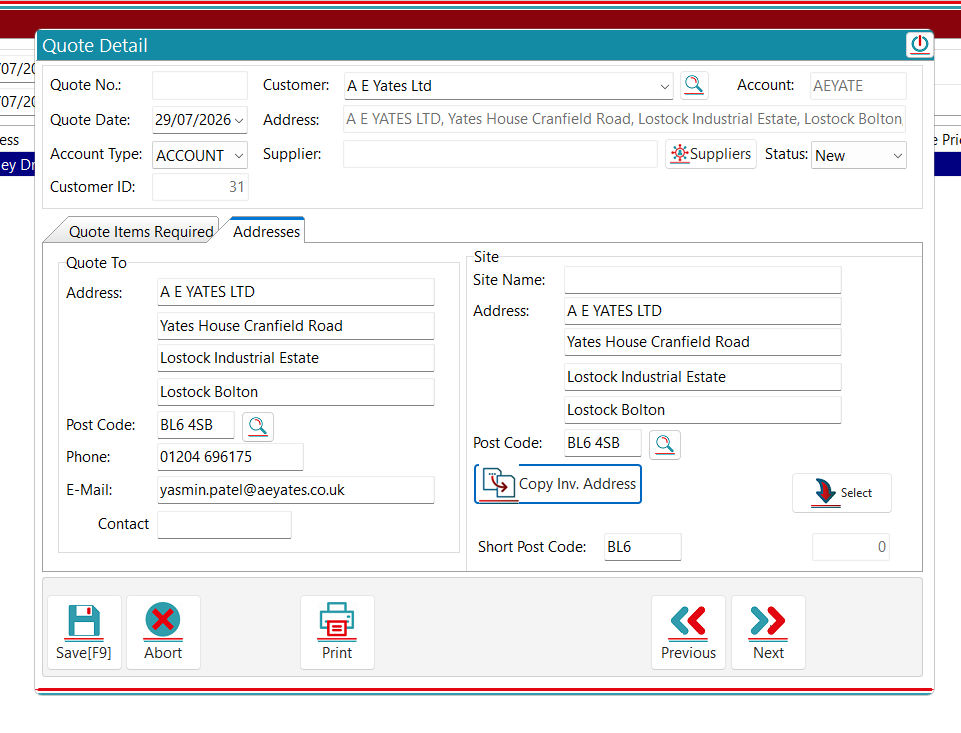
This allows you to select from the list of your own customers and create quotes using their already made details. This will populate their address into the Quote Address along with their Phone number, Email, and Main contact. For the site address you have the option to either search a postcode, copy the invoice address or click select, and this will show a list of the customer sites.
Now click New Item

You now have the option to select a service. What you can do is either from here click supplier, then if you have all your suppliers entered into skiptrak, the relevant service with a supplier and their prices will appear on the list. You can select these and then it will enter in the Sale Price, Cost price, Weight Price Etc. You are then able to select the markup which will then show you the profit of the quote item.
CASH:
Cash is basically the same in all fairness, mainly just the fact that instead of selecting your own customer, you make cash customers on the go. You can do the exact same as above but you are only able to create the customer name, you will have to input the customer’s details and the site details to save :)
Feedback

Post your comment on this topic.